> ## Documentation Index
> Fetch the complete documentation index at: https://explore.airia.com/llms.txt
> Use this file to discover all available pages before exploring further.
# Evaluate Agent Performance with Airia
Airia Evaluations provide a robust framework to measure the performance of your Agents and Large Language Model (LLM) applications. They help you understand how changes impact agent behavior, catch issues early, compare versions, and enhance reliability.
### Why Use Airia Evaluations?
* **Understand Performance:** Gain precise insights into how your AI agents perform across various scenarios.
* **Prevent Regressions:** Quickly identify and understand the impact of even small modifications, preventing unintended performance degradations.
* **Objectively Assess:** Compare the performance of new versions, prompt engineering efforts, or model updates across hundreds of test cases.
* **Proactive Issue Detection:** Identify performance degradations or undesirable behaviors before they affect users.
* **Optimize Key Metrics:** Monitor and improve critical metrics such as context accuracy, latency, answer relevance, and operational cost.
### Create an Evaluation
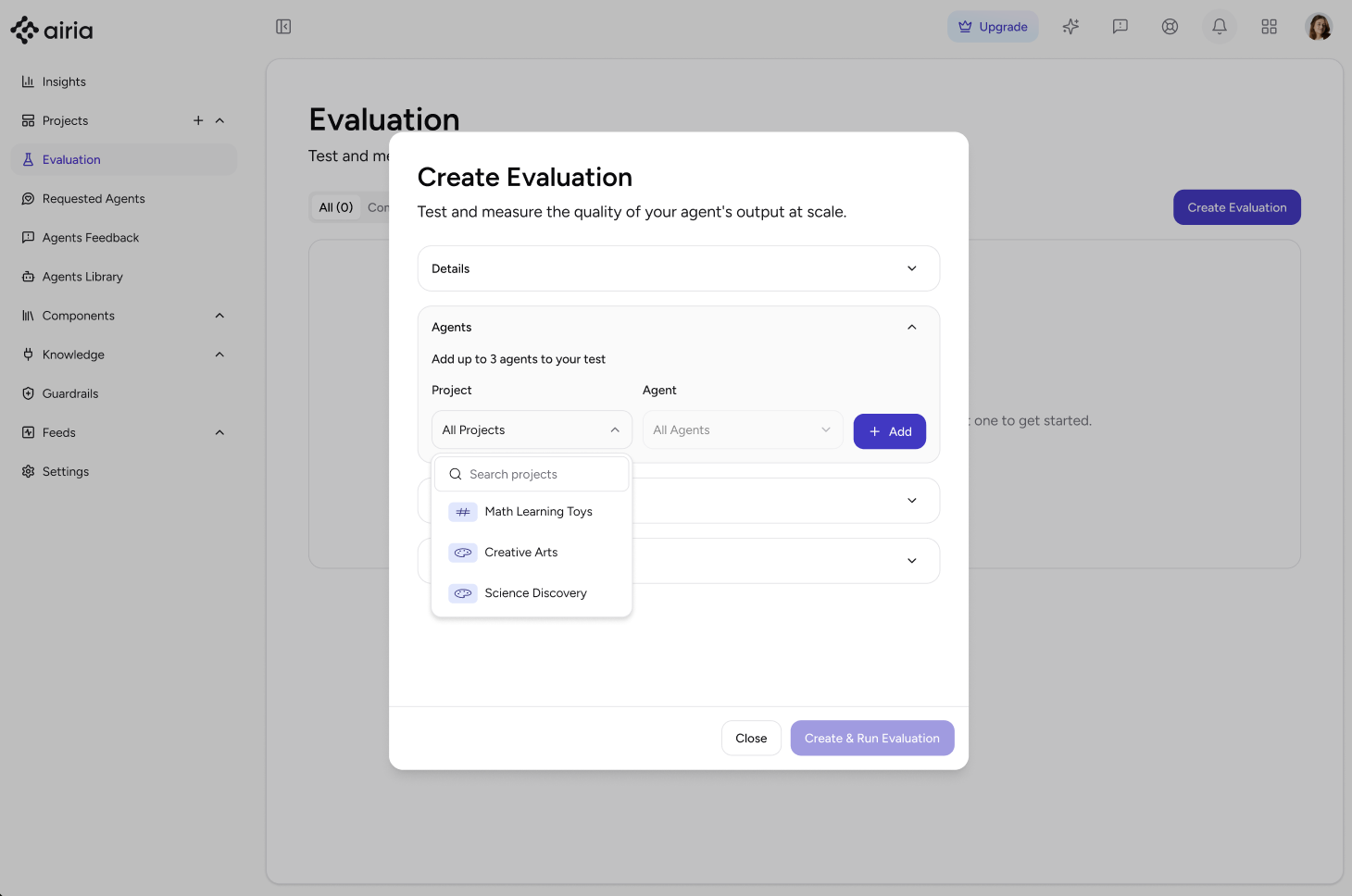
Follow these steps to set up and run an evaluation in the Airia Platform:
1. **Navigate to the Evaluation Page**
Go to the **Evaluation** page in the Airia Platform and click **Create Evaluation**.
 2. **Name Your Evaluation**
Enter a name for your evaluation and optionally add a description for context.
3. **Select Agents and Versions**
Choose the agent and its version you want to evaluate.
> 💡 **Note:** You can select up to three agents to be part of the same evaluation.
4. **Import Test Cases**
Import a `.csv` file containing the test cases for your evaluation. You can also export an example dataset to see the expected format.
> 💡 **Note:** The input/test queries must be in the first column of your `.csv` file. Headers are not included or counted by default.
5. **Select LLM Model for Evaluation**
Choose the LLM model to be used for the evaluation. Airia uses this model to assess the accuracy of your agent's responses.
Currently, the following models are supported:
* GPT-4o mini
* GPT-3.5 Turbo
* Claude 3.5 Haiku Latest
* Mistral Small Latest
* Gemini 2.0 Flash
6. **Run the Evaluation**
Once all details are configured, click **Create and run evaluation**. The evaluation will be created and automatically start executing the selected agents against your test cases.
### Understand Evaluation Results
After an evaluation completes, its status will be marked as **Success**.
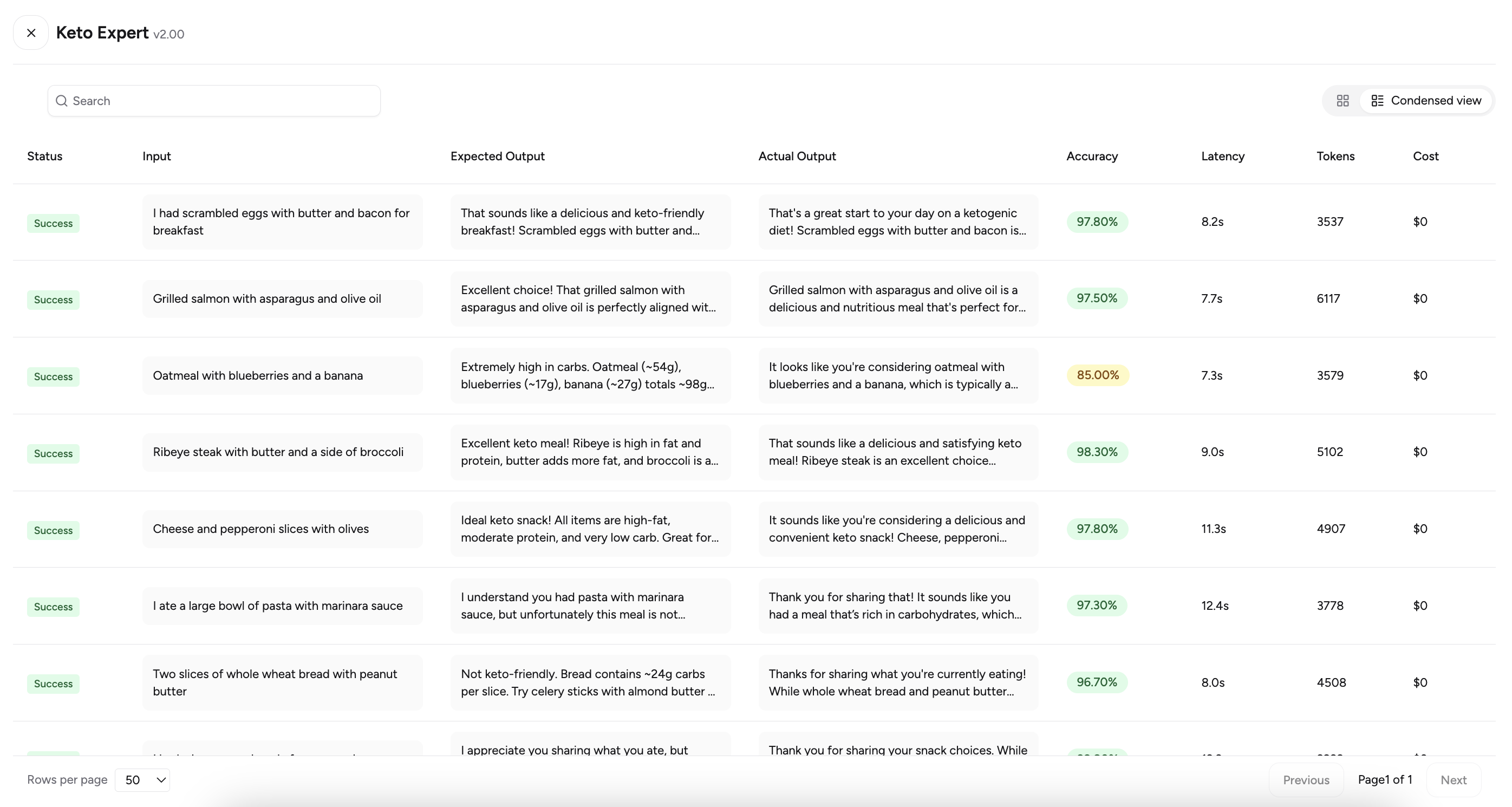
* **View Detailed Results:** Navigate to the evaluation to see a detailed table view for each agent's run. You can expand or collapse responses for a condensed or expanded view.
2. **Name Your Evaluation**
Enter a name for your evaluation and optionally add a description for context.
3. **Select Agents and Versions**
Choose the agent and its version you want to evaluate.
> 💡 **Note:** You can select up to three agents to be part of the same evaluation.
4. **Import Test Cases**
Import a `.csv` file containing the test cases for your evaluation. You can also export an example dataset to see the expected format.
> 💡 **Note:** The input/test queries must be in the first column of your `.csv` file. Headers are not included or counted by default.
5. **Select LLM Model for Evaluation**
Choose the LLM model to be used for the evaluation. Airia uses this model to assess the accuracy of your agent's responses.
Currently, the following models are supported:
* GPT-4o mini
* GPT-3.5 Turbo
* Claude 3.5 Haiku Latest
* Mistral Small Latest
* Gemini 2.0 Flash
6. **Run the Evaluation**
Once all details are configured, click **Create and run evaluation**. The evaluation will be created and automatically start executing the selected agents against your test cases.
### Understand Evaluation Results
After an evaluation completes, its status will be marked as **Success**.
* **View Detailed Results:** Navigate to the evaluation to see a detailed table view for each agent's run. You can expand or collapse responses for a condensed or expanded view.
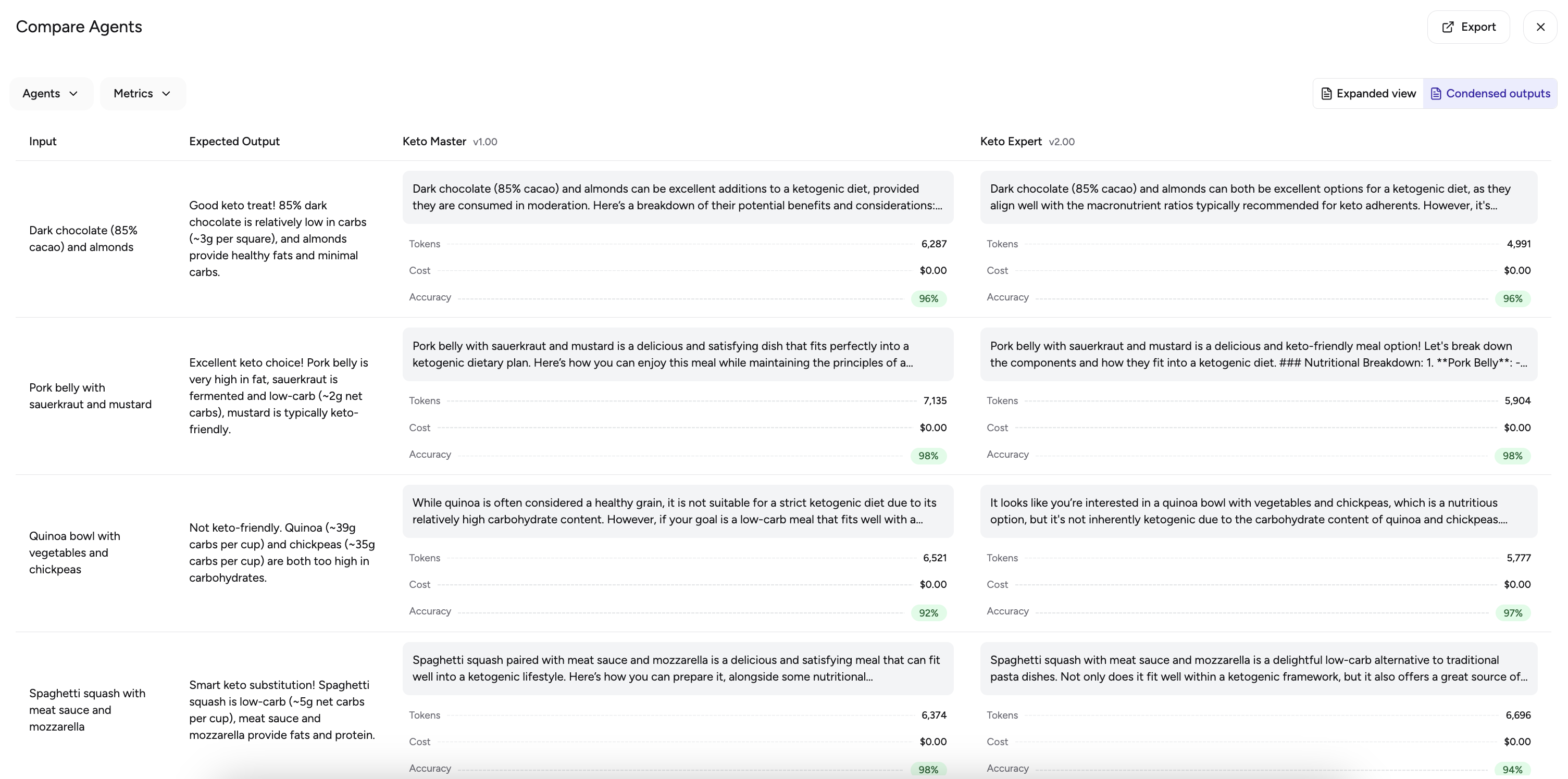
 * **Compare Agents:** Use the **Compare** option to view a synthesized comparison of results across all selected agents.
 > 💡 **Note:** If an evaluation is **running**, you can **Stop** it at any time. Stopping and then **Run**ning it again will create a new evaluation.
#### Understanding the Accuracy Score
One of the most important metrics is the **Accuracy** of the agent's response.
> 💡 **Accuracy Score Calculation:** Airia calculates a unique accuracy score using a weighted geometric mean of four factors: **Hallucination**, **Correctness**, **Relevance**, and **Semantic Similarity**. Each dimension captures a key aspect of agent performance—factual grounding, alignment with expected output, task focus, and semantic closeness. The formula penalizes weak areas to ensure the final score reflects true execution quality.
In the **Evaluation summary** tab, you can find a detailed explanation of each agent's run and insights into why the accuracy score was high or low.
> 💡 **Note:** If an evaluation is **running**, you can **Stop** it at any time. Stopping and then **Run**ning it again will create a new evaluation.
#### Understanding the Accuracy Score
One of the most important metrics is the **Accuracy** of the agent's response.
> 💡 **Accuracy Score Calculation:** Airia calculates a unique accuracy score using a weighted geometric mean of four factors: **Hallucination**, **Correctness**, **Relevance**, and **Semantic Similarity**. Each dimension captures a key aspect of agent performance—factual grounding, alignment with expected output, task focus, and semantic closeness. The formula penalizes weak areas to ensure the final score reflects true execution quality.
In the **Evaluation summary** tab, you can find a detailed explanation of each agent's run and insights into why the accuracy score was high or low.