

Structured Output for AI Models
Turn free-form model responses into predictable, well-structured JSON.With Structured output (JSON), you can define a JSON schema for an AI Model step.
Airia will instruct the model to return responses that conform to this schema so downstream steps can reliably consume the data. This is ideal for:
- Lead / ticket / incident qualification
- Data extraction from unstructured text
- Routing decisions, classifications, and scoring
- Any workflow that expects typed fields instead of free-form text
Enabling Structured Output
- Open an AI Model step in your workflow.
- Scroll to the Output section.
- Toggle Structured output ON.
- Click Edit Schema to configure the JSON schema.
- Simple – A visual table where you define properties, types, and required flags.
- Advanced – A raw JSON Schema editor for full control.
Defining Your JSON Schema
In the Structured output (JSON) modal, you configure:Name
A human-readable name for the schema, e.g.CompanyDetails, QualificationResult, RoutingDecision.
Properties
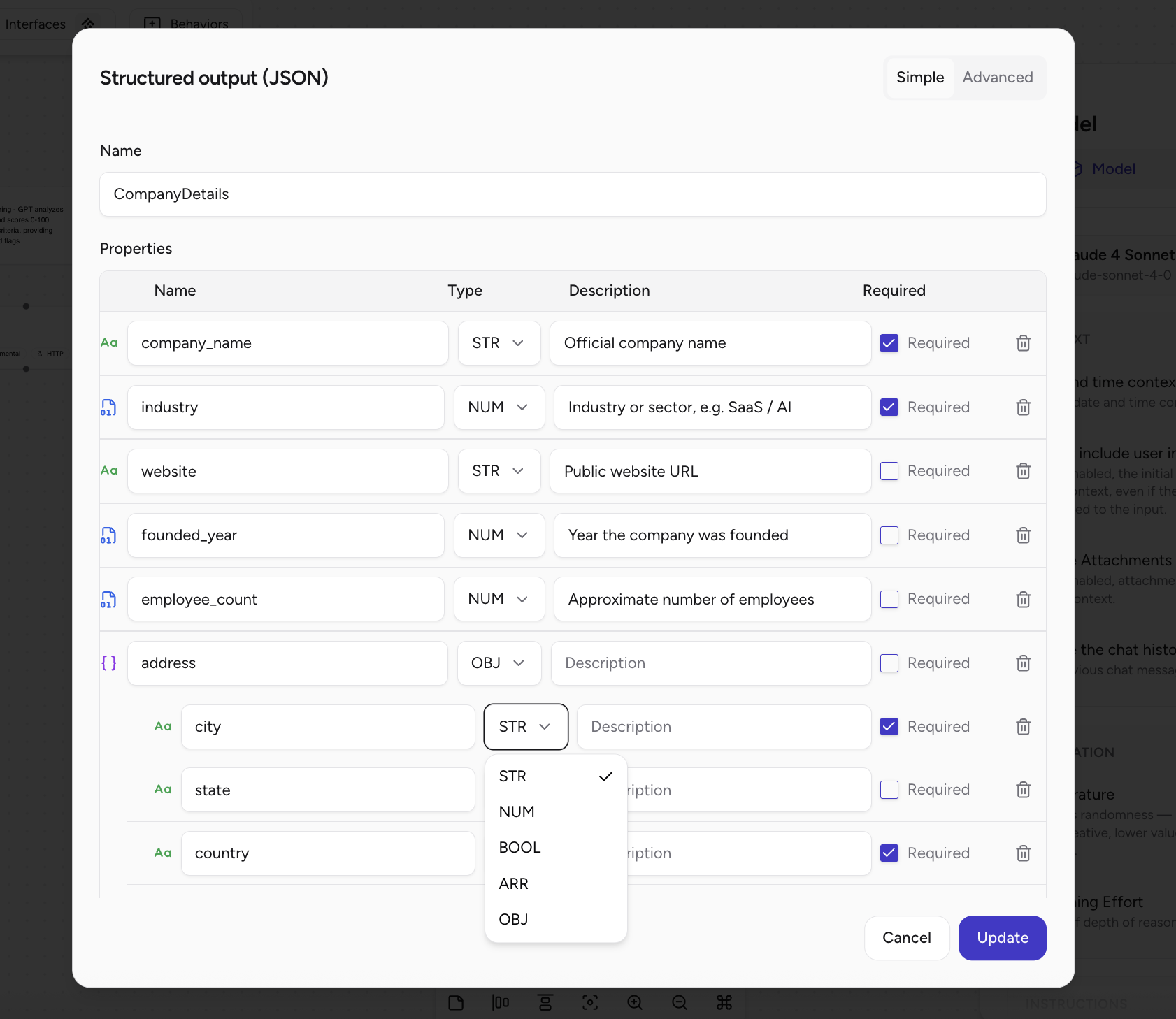
Each property becomes a field in the model’s JSON response:- Name – The JSON key, e.g.
company_name,industry. - Type – The data type:
STR– stringNUM– number (int or float)BOOL– booleanARR– arrayOBJ– nested object
- Description – Short, clear description of what the field represents. This is prompting signal for the model.
- Required – Whether this field must be present in the output.
address with city, country) and arrays of objects for more complex structures.
How the Model Uses Your Schema
When structured output is enabled:- The model is instructed to return valid JSON that matches your schema.
- It will attempt to respect:
- Field names
- Types
- Required vs optional fields
Required vs Optional Fields
How missing information is handled depends on your schema and prompt:Required fields
- The model will try to infer, extrapolate, or generate plausible values based on context.
- This is useful when you truly need a value, but it can be problematic if the model’s inference is incorrect.
- You should validate or confirm these values when they come from partial input.
Optional fields
- Optional fields can be:
- Omitted from the output, or
- Set to
null(if your schema allows it).
- This is safer for information that may not always be available.
💡 Guiding principle
Use required fields only for data that is truly critical and should block the workflow if missing.
Use optional or nullable fields for everything else.
Handling Missing or Uncertain Information
Structured output does not replace good workflow design. You still need a strategy for when the user or upstream steps don’t provide enough data.1. Validation & Prompting Strategy
Design the agent to handle missing information before calling the AI Model step:- Check if critical information is present (e.g. company name, email, issue type).
- If something important is missing:
- Prompt the user to provide it first, or
- Branch to a different path (e.g. a “clarify” step).
- Use a two-step process where needed:
- Gather / clarify information.
- Call the AI Model step with structured output.
2. Default Values & Nullable Types
For non-critical fields, you can use defaults or nullable patterns:- Define sensible defaults in your schema or downstream logic (e.g.
"priority": "medium"). - Use nullable types (e.g.
string | null) for fields that might not be provided. - For optional fields:
- Allow them to be omitted entirely if not relevant.
3. Iterative Refinement with the User
For higher-stakes workflows:- Let the model generate a first pass of the structured output with:
- Best guesses where appropriate, and/or
nullor omitted fields where information is missing.
- Present the result back to the user or another agent for review.
- Allow the user to confirm, edit, or fill in missing data.
- Store or use the confirmed version in downstream steps.
Best Practices for Structured Output Prompts
Your prompt should explicitly tell the model how to behave with missing or uncertain data.1. Clear Role and Objective
Example system / instructions:You are a data extraction assistant that converts user input into a structured JSON object.
Your primary goal is to accurately capture provided information and clearly indicate what is missing or uncertain.
2. Explicit Rules for Missing Information
You can add strict rules like:Rules for missing information:Align these rules with how you configured required vs optional fields in the schema.
- NEVER guess, invent, or fabricate information that was not explicitly provided.
- Set fields to
nullif the information is not provided.- Use empty strings
""only for fields that were mentioned but intentionally left blank.- For optional fields, omit them entirely if the information is not provided (when allowed by the schema).
- Do not make assumptions from partial information unless explicitly instructed.